
In Case of Emergency - ICE
Techxonia, LLCMedical
3.939.00 Reviews
- Version
- 2.3.0
- Installs
- 10.00K
- Age Rating
- Everyone
Screenshots
Our Review of In Case of Emergency - ICE
 Analysis by Appyee
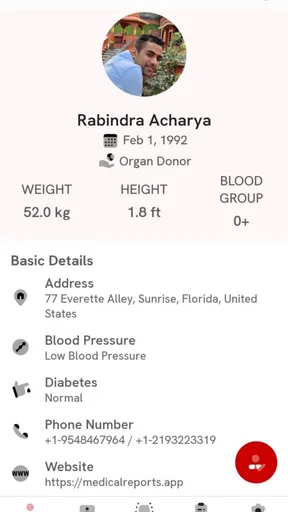
I look at emergency apps differently from ordinary medical tools. I do not need one to entertain me or replace professional advice; I need it to help me stay organized when stress makes even simple decisions harder. In Case of Emergency - ICE takes that practical route by combining emergency medical information with a way to record family medical history. After spending time with it, I see it as a small preparedness tool rather than a complete health-management platform.
That distinction matters. The app is free to install, is aimed at Everyone, and comes from Techxonia, LLC. Its focus is narrow enough to be understandable: keep useful medical context available for an emergency and make family history easier to track. I found the concept most valuable for households where important details are scattered between memory, paper documents, and different relatives’ phones.
The Android release is listed as version 2.3.0 and works from Android 8.0 onward. That gives it a fairly broad reach, especially for people who keep an older phone as a backup device. It has a 3.9 average from around 165 ratings, with roughly 39 written reviews, and has passed 10K installs. Those figures suggest a modest, practical utility rather than a heavily established medical ecosystem.
How the app feels when speed matters
I find the app’s trust question is less about its emergency-focused name and more about how thoughtfully I choose what to put into it. Medical details can help someone understand a situation, but they are personal, so I would start with only information that is relevant and confirmed. That makes it easier to consider the controls and choices I would want to check before relying on the app.
Quick access is more important than visual polish
My first test was not about exploring every screen. I approached it as I would during a worrying moment: open the app, identify where emergency information belongs, and decide whether the content can be understood without much thought. That is the right standard for this kind of product. In an urgent situation, an attractive layout is secondary to clear organization and predictable movement.
The app’s purpose gives it an advantage over a general notes application. A blank notes page makes me decide how to structure medical information before I can use it. An ICE-focused tool starts with a more relevant mental model: emergency details in one place and family history in another. That reduces preparation friction, provided I take the time to fill it in before anything happens.
There is also an important limitation to the idea of speed. An app cannot help much if the phone is locked away, the battery is empty, or nobody knows that the information exists. I would treat this as one part of a preparedness routine, not the only emergency channel. A printed backup and a conversation with close family members remain sensible, particularly for older relatives or anyone who may not be comfortable navigating a phone.
Preparation determines the real response time
The fastest experience comes from doing the slow work first. I would enter information when calm, check it for mistakes, and review it after a medication change or diagnosis. That workflow is more important than repeatedly opening the app to see whether it launches quickly. Emergency information becomes useful through accuracy and familiarity, not just availability.
A useful approach is to build the record in stages. I would begin with the details most likely to affect immediate care, then add family-history context later. This prevents the setup process from becoming a large project that I keep postponing. It also makes it easier to notice which entries need confirmation from relatives rather than relying on uncertain memories.
One non-obvious trade-off is that a detailed history can be more useful for long-term conversations with a doctor than for an immediate emergency. Those are different jobs. I would keep urgent information concise and use the family-history area for patterns, conditions, and relationships that deserve a slower review. Mixing every detail together could make the important points harder to find when pressure is high.
What happens during heavy-use moments
For this app, “heavy use” is not the same as streaming video or running a demanding game. The demanding moment is cognitive: several people may be asking questions while one person tries to find a relevant medical detail. The app’s value depends on whether its information remains readable and logically grouped when attention is divided.
I would not expect it to replace a full electronic health record. It is better suited to a compact personal reference than to managing years of appointments, laboratory results, prescriptions, or clinical documents. If you need those functions, a hospital portal, a dedicated health-record service, or a secure document system may be the better choice. The strength here is the emergency-and-family-history combination, not breadth.
A realistic example is a family road trip. One traveler may know that a parent has a particular condition, while another knows the medication name, and neither remembers the complete history. Before leaving, I would use the app to consolidate what the family has confirmed. If an incident occurred, the person helping could start from a prepared reference instead of collecting fragments through several phone calls. That does not diagnose anything, but it can reduce confusion.
Another useful scenario is preparing for a routine appointment. I could review the family-history record beforehand and identify questions that deserve professional attention. This is where the app may offer more lasting value than a one-time emergency reference: it encourages me to turn vague family recollections into a record I can discuss responsibly with a clinician.
Stability and trust in everyday use
I judge stability here by consistency and recoverability rather than by demanding long sessions. A medical reference app should open without drama, keep information understandable, and avoid making me wonder whether an entry was saved. I would also revisit important records after updating them, because a medical note that exists only in my memory is not a dependable record.
The app’s modest size of purpose is reassuring in one way. It is not trying to be a social network, a fitness dashboard, a telemedicine service, and a medication marketplace at once. Fewer responsibilities can make a tool easier to understand. At the same time, the narrow scope means I should not assume that it covers every emergency need simply because its name is prominent on the phone.
Recovery planning deserves special attention. I would not rely on a single phone as the only copy of critical information. When moving to a new device, replacing a damaged phone, or helping a relative set up the app, I would verify that the records are still available and accurate rather than assuming every personal detail will follow automatically. I would also keep a separate backup of essential information in a form the family can actually access.
This is not a criticism unique to this app; it is a basic rule for emergency records. Digital convenience can create false confidence. The safest workflow is to use the app as a central reference while making sure trusted people know where it is and what to do if the device cannot be used.
Privacy and the human side of medical records
Medical history is sensitive even when it is entered for a good reason. I would think carefully about whose information I record and how much detail is appropriate. Family members may not want every personal detail stored on another person’s phone, and a record based on a casual conversation can easily turn into an inaccurate assumption.
My practical advice is to label uncertainty clearly in your own workflow and confirm significant information with the person concerned or a qualified professional. Do not treat a family-history note as a diagnosis. The app can help organize what you know, but it cannot determine whether a condition is inherited, current, or medically relevant to a particular emergency.
This is also why I would avoid filling the record with dramatic speculation. A shorter, confirmed record is more useful than a long collection of rumors. The best entry is one that helps a responder or clinician understand the situation without forcing them to separate facts from guesses.
Device constraints and who should use it
Support for Android 8.0 and newer makes the app accessible to people who do not own a recent flagship phone. That is a meaningful advantage for families who pass older devices between relatives or keep a low-cost handset available for emergencies. I would still test it on the actual device intended for use, because an app that works in principle is not enough if the owner struggles with small text, unfamiliar navigation, or a crowded home screen.
Resource demands are best understood through the app’s role. I would expect a medical reference tool to be less demanding than a media-heavy application, but I would not make assumptions about battery use or storage without measuring the exact phone and usage pattern. In practice, the larger constraint is likely to be human: remembering to update records, keeping the device charged, and teaching another person how to find the information.
Older users may need a simple setup session. I would install it with them, enter the first essential details together, and place it somewhere easy to locate. A family member who cannot confidently open the app during an emergency will not benefit from its existence. That makes a short demonstration more valuable than adding dozens of optional entries.
The Everyone age rating also makes the app approachable for a household setting, but it should not be confused with medical suitability for every situation. Children, adults, and older people can all be part of the record, yet the information should be maintained by a responsible person and checked for accuracy. The age label describes accessibility, not clinical authority.
Free access, optional purchases, and practical value
Because the app is free, it is easy to try without committing money first. That suits its purpose: I can see whether the organization fits my family’s habits before deciding whether it deserves a permanent place on the phone. Optional in-app purchases range from $0.99 to $3.99 per item, so I would review what each purchase changes before paying and ask whether the added value matches my actual use.
I would be especially cautious about buying extras simply because the situation feels important. Emergency preparedness can encourage impulse decisions. The free starting point is enough to evaluate the basic workflow, and I would only consider an optional item after confirming that the app solves a real problem for my household.
Compared with the usual alternatives, the app sits between a paper emergency card and a broad health platform. Paper is dependable when a phone is unavailable, but it is harder to update and easier to misplace. A notes app is flexible, yet it provides less guidance and can bury medical information among unrelated notes. A clinical portal may offer richer records, but access can depend on a healthcare provider and may be excessive for family-history organization.
That middle position is the clearest reason to choose it. I would recommend it to someone who wants a focused place for emergency medical context and family history, especially if the alternative is keeping everything in scattered messages. I would skip it for someone seeking appointment management, live medical advice, detailed medication reminders, or a complete replacement for professional health records.
My performance verdict after using it as intended
In Case of Emergency - ICE works best when I treat it as a prepared reference, not a rescue service. Its perceived speed comes from having the right information ready, its stability depends on regular checking, and its recovery value depends on maintaining a backup plan. Those are not glamorous features, but they are the realities that decide whether an emergency app helps when circumstances become difficult.
Techxonia, LLC has kept the concept understandable: emergency information paired with family medical history. That focus gives the app a clear audience, while also setting a firm boundary around what it can do. It is not the right choice for people who need a full medical-management system, and it should never replace emergency services or professional judgment.
For my own use, I would install it when the goal is to create a concise family reference, then schedule occasional reviews rather than assuming the first setup is permanent. I would confirm important facts, explain the app to another trusted person, and keep a non-digital fallback for situations where the phone is inaccessible. The most useful feature is not simply storing information; it is turning scattered family knowledge into something easier to find and discuss responsibly.
Overall, I see it as a sensible free starting point for Android users who want focused emergency preparation without adopting a large health platform. The 3.9 average reflects a tool that is useful but not universal. If your needs match its narrow purpose and you are willing to maintain the records, it can earn its place on your phone. If you expect automatic medical guidance, comprehensive records, or guaranteed access in every circumstance, choose a broader solution and keep this kind of app, if at all, as only one layer of your preparation.
Verdict
Strengths of In Case of Emergency - ICE
- Stores vital medical details for quick access during emergencies.
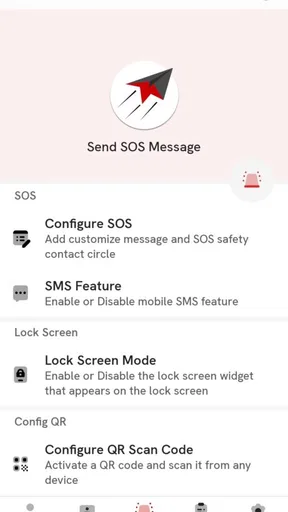
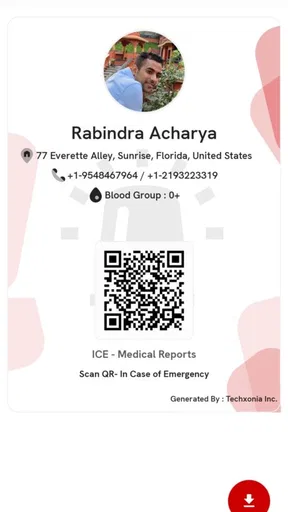
- Can display emergency contacts and important information on the lock screen.
- Simple interface makes essential data easy to find under pressure.
- Useful for people with allergies, chronic conditions, or special needs.
- May help first responders communicate with family more quickly.
Limitations of In Case of Emergency - ICE
- Its usefulness depends on keeping medical information accurate and updated.
- Some features may vary depending on the device and Android version.
- Personal health data requires careful consideration of privacy and security.
- Emergency responders may not know where or how to access the information.
- It cannot replace professional medical care or an emergency call.
Similar Picks in This Category
View All
WebMD: Symptom Checker
WebMD, LLC4.1

Microphone Amplifier
DOSA Apps4.2

Anatomy Learning - 3D Anatomy
3D Medical OU4.5

Period Tracker and Calendar
SimpleInnovation4.9

GoodRx: Prescription Coupons
GoodRx4.8

CVS Health
CVS Pharmacy4.5
Frequently Asked Questions
What is In Case of Emergency - ICE, and what is it used for?
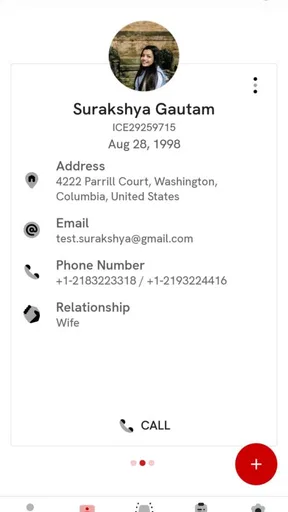
In Case of Emergency - ICE is an emergency information app designed to keep essential medical and contact details accessible when you may not be able to communicate yourself. After setting it up, you can store information such as emergency contacts, allergies, medications, blood type, and relevant medical conditions. The app is intended to help family members, first responders, or medical staff find important information quickly during an emergency.
What information can I add to my ICE profile?
The app generally allows you to create an emergency profile containing details that could be useful to responders, including your name, date of birth, blood type, allergies, medications, medical conditions, doctor information, and emergency contacts. Before relying on it, review every field carefully and keep the information updated. Only add accurate details, because outdated or incorrect medical information could cause confusion during a stressful situation.
Can emergency contacts or medical information be viewed without unlocking my phone?
The main purpose of an ICE app is to make selected emergency information available even when accessing the full phone is difficult. Depending on the device, app version, and your privacy settings, the information may be displayed through the app, a lock-screen feature, a widget, or another emergency-access option. Test the setup after installation and confirm that the details are actually visible without compromising information you want to keep private.
Does In Case of Emergency - ICE automatically contact emergency services or my family?
You should not assume that the app automatically calls emergency services, sends text messages, shares your location, or alerts your contacts. ICE tools are primarily information-storage and emergency-access utilities, and available communication features can vary by version and device. Check the app’s permissions and settings carefully, and continue using your phone’s built-in emergency calling and location-sharing functions when immediate assistance is required.
Is In Case of Emergency - ICE a replacement for medical identification or professional emergency services?
No. The app should be treated as a supplementary source of information rather than a substitute for a medical ID bracelet, official health records, a doctor’s advice, or emergency services. Keep your profile current, but also consider carrying a physical medical ID if you have serious allergies or conditions. In a life-threatening situation, contact local emergency services first and follow instructions from qualified professionals.
